Step 1: Choose a block to be the lucky block and a location (press F3 to see coordinates). From that location, summon a marker at that coordinate with a tag of your choice. Use this command:
summon minecraft:marker 61 22 -1010 {Tags:["marcador"]}
The marker is used to create an empty entity that has a fixed location/coordinate in the world
Using it, we can run commands without needing to manually type coordinates
I chose the gold block to be the lucky block, and the marker is at the same coordinate
Now let's create the luckyblock scoreboard to assign a random number to the player
scoreboard objectives add luckyblock dummy
This number will be used to generate random items as soon as the chosen block is broken
Step 2: Place this command in a Repeat command block set to Always Active to detect when the chosen block is broken
execute at @e[tag=marcador] unless block ~ ~ ~ minecraft:gold_block
We need to place a comparator, a piston, and a redstone block to make the command that generates the items run only once after the block is broken
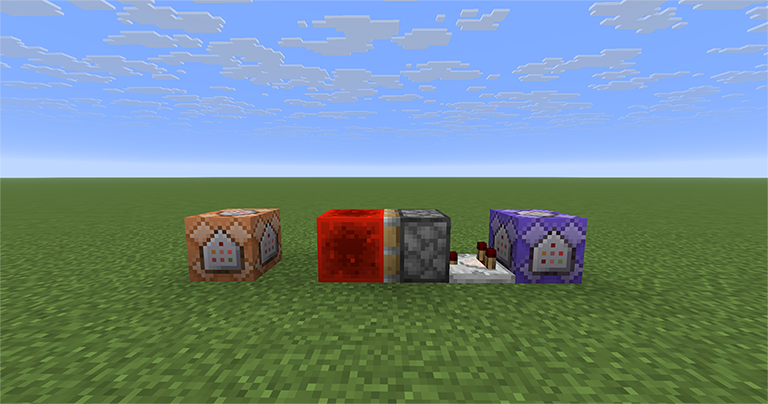
The image shows what we need to do: the Repeat command block detects the block, and the Impulse command block runs the function (which I will explain better in the next step)
Step 3: Place this command in the Impulse command block
execute as @e[tag=marcador] run function comandos:luckyblock
This command will run the function at the marker's location and drop a random item as soon as the block is destroyed
Below are the function commands that will be executed on the marker, and at the end it will be removed from the world
execute store result score @s luckyblock run random value 1..5
execute if score @s luckyblock matches 1 run execute at @s run summon item ~ ~1 ~ {Item:{id:"minecraft:diamond",count:1}}
execute if score @s luckyblock matches 2 run execute at @s run summon item ~ ~1 ~ {Item:{id:"minecraft:stone",count:5}}
execute if score @s luckyblock matches 3 run execute at @s run summon item ~ ~1 ~ {Item:{id:"minecraft:iron_ingot",count:2}}
execute if score @s luckyblock matches 4 run execute at @s run summon item ~ ~1 ~ {Item:{id:"minecraft:gold_ingot",count:2}}
execute if score @s luckyblock matches 5 run execute at @s run summon item ~ ~1 ~ {Item:{id:"minecraft:dirt",count:10}}
kill @s
Just replace the items with the ones you want and expand it to 6, 7 items or more, using random value 1..6, 1..7, etc
You can download the function by clicking here and drag it into your world folder. If you have never created a function and don't know what it is, check out this tutorial to understand and do this process
Place this command in a Repeat command block set to Always Active so the broken block does not drop as an item. Just change it to the ID of the block you chose
kill @e[type=item,nbt={Item:{id:"minecraft:gold_block"}}]



